OBD2 Car Scanner - ELM Torque
- 4.6
- Rating
- 1.00M
- Installs
- Free
- Price
 Analysis by App-foxy
I like car apps that solve one clear problem without pretending to replace a mechanic, and OBD2 Car Scanner - ELM Torque is built around exactly that idea. It turns a compatible phone-and-adapter setup into a practical window into a vehicle’s diagnostic system. Instead of waiting for a warning light to become a mystery at the repair shop, I can use it to read information from the car and get a better starting point for deciding what deserves attention.
That makes it a useful Auto & Vehicles app for curious drivers, careful used-car shoppers, and owners who want more context when the dashboard suddenly lights up. It is free to install, suitable for Everyone, and developed by Cards. The app has reached over 500 thousand installs and holds a 4.4 average from around 5.8 thousand ratings, which gives it a reassuring level of real-world interest without making it automatically right for every vehicle or every driver.
What the OBD2 capability changes in everyday driving
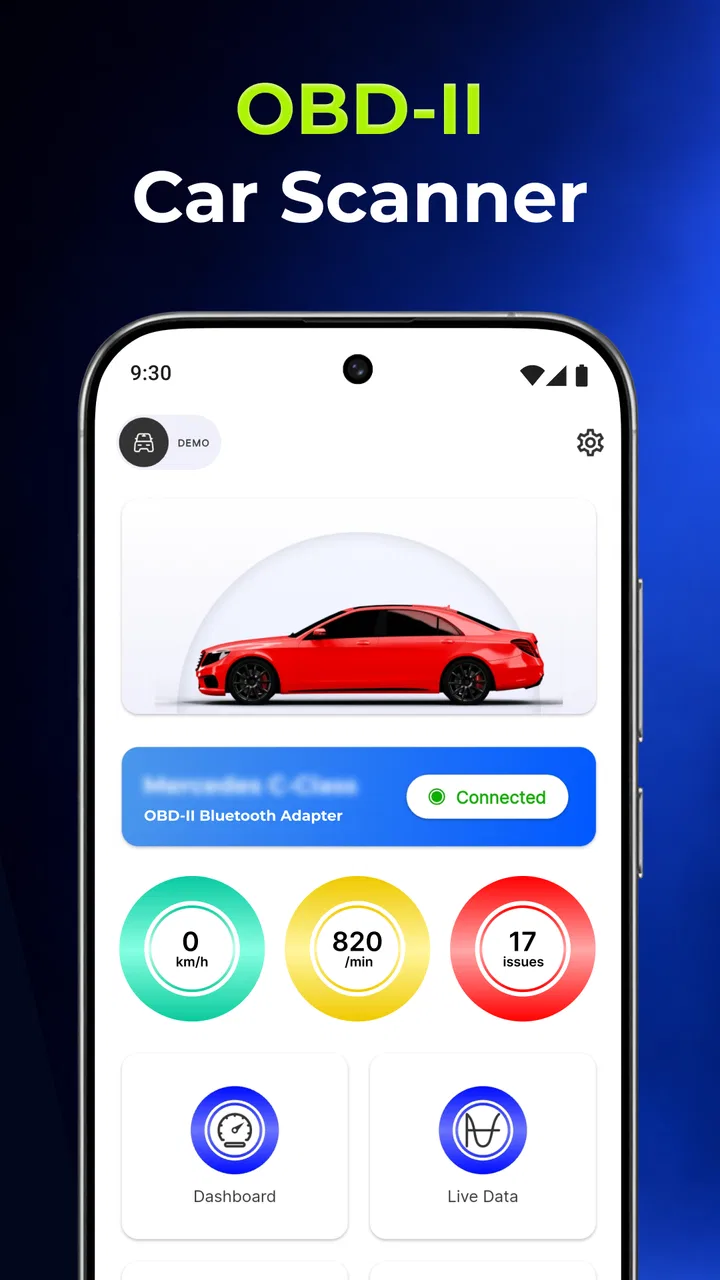
The important capability here is not simply displaying car information. The real value is the connection between the app and an OBD2 adapter: the app can act as an accessible reader for information that would otherwise remain hidden behind the vehicle’s diagnostic port. That changes the conversation from “the engine light is on” to “there is diagnostic information I can inspect before deciding what to do next.”
You May Also Like

 Blood Strike: 2.5 Anniversary
Blood Strike’s Loadouts Turn Every Drop Into a Tactical Gamble
A close look at Blood Strike’s custom loadouts: how fast access to signature weapons reshapes its battle royale rhythm, rewards preparation, and narrows the gap between fights.

 Pandora - Music & Podcasts
Pandora’s Music Is Easy to Start, but Harder to Recover
Pandora’s strength is its low-effort path from a seed to a station. Its weak spot is how much confidence it asks you to place in connection, setup, and quiet recovery.

 8 Ball Pool
 Is Built on Rivalries, Rematches, and Routine
A close look at the rivalries, rematches, shared routines, and unanswered safety questions that turn a quick pool match into a persistent mobile community.

 Samsung Music
’s Quiet Strength Is Playing What You Already Own
Its reach comes less from spectacle than from dependable access to a personal library. That simplicity is both the app’s strongest retention engine and its ceiling.

 AccuWeather: Weather Radar
AccuWeather Review: A Quick, Clear Forecast for Everyday Decisions
For everyday plans, the best forecast is the one you can understand quickly. AccuWeather makes rain timing, radar, and local conditions easy to act on, with a few trade-offs.

 Hill Climb Racing
Why Hill Climb Racing Still Turns Crashes Into One More Run
A tiny car, a bumpy hill and one more upgrade: Hill Climb Racing keeps resurfacing because its simple chaos makes every near-miss feel personal.
More From Our News Desk



I find that distinction especially useful because a warning light is often too vague for a driver to interpret alone. A scanner does not magically explain every repair, but it can provide a more informed first step. I can check whether a problem is still present, whether a code has returned after a repair, or whether a used car deserves a closer look before I commit to buying it.
The app’s role is best understood as an information tool, not a promise of a complete mechanical diagnosis. An OBD2 reading can point toward an area of concern, yet the same code may have several possible causes. A loose connection, a failing sensor, a wiring issue, or a larger mechanical problem can sometimes produce related symptoms. The useful result is better direction, not blind certainty.
That limitation is actually important for using the app responsibly. If I see a code, I would treat it as a clue to investigate rather than immediately ordering parts. The app can help me ask a better question at a garage, compare the code with the car’s symptoms, and avoid being completely dependent on a vague dashboard message. It cannot replace proper testing when the vehicle is unsafe, running badly, or showing signs of a serious fault.
Connecting the app to a real vehicle
To use an OBD2 scanner app, I need more than the phone application itself. The vehicle must have a compatible diagnostic system, and I need an appropriate OBD2 adapter that can communicate with the phone. That extra hardware is the first practical question a new user should answer. Installing the app alone will not produce readings from a car sitting in the driveway.
The setup experience also depends on the adapter and the phone’s connection method. Some adapters use wireless communication, while others may work differently depending on the device and vehicle. I would therefore check compatibility before buying an adapter specifically for this app. This is one of the less obvious trade-offs: the free app can still lead to an accessory purchase, and a poor-quality adapter can make the whole experience feel unreliable even when the app is working correctly.
Once the connection is ready, I would begin with the car parked safely, the ignition in the state required by the vehicle, and the phone close enough to maintain a stable connection. I would avoid experimenting while driving. A driver should not be reading screens, changing settings, or interpreting diagnostic information on the road. The best workflow is to collect information while stationary and review it later.
Another practical tip is to record the situation before clearing anything. If a warning appears, I would note when it started, whether the car feels different, and what the app reports. Clearing a code may make the dashboard look normal for a while, but it does not repair the underlying cause. Keeping the original information gives a mechanic more context and makes it easier to notice if the same problem comes back.
How I would use the readings instead of chasing numbers
The temptation with a scanner is to watch every available value and assume that more information automatically means better understanding. In practice, I get more value by connecting each reading to a specific question. Is the warning light related to a problem that appeared after refueling? Did the vehicle begin running roughly at the same time? Does the issue return after a short drive? A focused question makes the app more useful than simply staring at a long stream of data.
I would also compare the app’s information with the car’s behavior. If the engine is stumbling, the smell of fuel is unusual, or the vehicle is losing power, a diagnostic code should be considered alongside those symptoms. If there are no symptoms and the code appears briefly, I would still keep a record rather than assuming the issue is harmless. This approach prevents two common mistakes: panicking over a single code or dismissing a recurring warning because the car still starts.
A particularly helpful workflow for a used-car inspection is to scan before and after a proper test drive, while also checking whether warning indicators have been recently reset. A freshly cleared system may not immediately show a complete picture, so the absence of a current code is not proof that a car is trouble-free. I would use the app as one part of an inspection that also includes service records, a physical check, and, for an expensive purchase, an independent mechanic.
That is where this app can be more useful than a basic dashboard display. The dashboard tells me that the vehicle wants attention; an OBD2 tool can give me a more specific starting point. Compared with visiting a shop for every initial question, it can save time and help me communicate more clearly. Compared with a professional diagnostic platform, though, it is a simpler consumer-facing option and should not be treated as the final authority for complex faults.
The strongest everyday scenario: the warning light before a long trip
The situation where I see the clearest benefit is a warning light appearing a few days before a road trip. My first step would be to avoid guessing. With the car parked, I would connect the adapter, open the app, and read the available diagnostic information. I would write down the result, note how the car is behaving, and then decide whether I need immediate professional help or a scheduled inspection.
If the car is shaking, losing power, overheating, or producing unusual smoke or smells, I would not use a reassuring-looking app result as permission to continue driving. Safety comes first. If the vehicle feels normal and the information points to a less urgent issue, the app can still help me arrange service with a clearer explanation. That can make a phone call to a mechanic more productive because I am describing an observed condition rather than only saying that a light appeared.
There is also a money-saving angle, but I would keep it realistic. The app may help me avoid an unnecessary diagnostic visit for a minor question, or help me recognize when a seller’s explanation deserves verification. It does not guarantee a cheaper repair, and it should not be used to approve a repair based on a code alone. The saving comes from being better prepared, not from pretending that professional labor is unnecessary.
For a family car, this can be useful even if nobody in the household is mechanically confident. I can capture the code and the circumstances, then show that information to a technician. For an enthusiast, the appeal is greater because the app offers a way to observe the vehicle more closely. For a first-time driver, the main lesson is knowing when to stop experimenting and ask for help.
Where it differs from the usual alternatives
The usual alternatives fall into three groups: ignoring the warning until it becomes serious, visiting a repair shop immediately for every alert, or buying a dedicated scanner. This app sits between those choices. It offers more information than the dashboard alone and more convenience than carrying a separate display, while still relying on a compatible adapter and the vehicle’s own diagnostic capabilities.
A dedicated scanner may be the better choice for someone who works on several cars, needs a self-contained tool, or dislikes pairing a phone with hardware. A professional workshop system is the better option for advanced troubleshooting, manufacturer-specific procedures, and repairs that require tests beyond ordinary consumer scanning. On the other hand, the app is attractive for an owner who already carries a phone everywhere and wants a relatively approachable first layer of information.
The comparison is not only about features; it is also about responsibility. A cheap standalone reader may be simpler, but an app can be easier to update or use as part of a phone-based record-keeping habit. Neither option makes a diagnosis automatically correct. The deciding factor is how much detail I need, how often I will use the tool, and whether I am comfortable interpreting results without overconfidence.
Friction points I would consider before installing
The first friction point is compatibility. OBD2 is common, but not every vehicle exposes the same information in the same way, and the adapter matters. I would not assume that every car, phone, or adapter combination will behave identically. If the app cannot connect, the problem may be the adapter, the vehicle, the phone connection, or the setup sequence rather than the scanner interface itself.
The second is interpretation. A code can be technically accurate and still be misunderstood. Replacing the part named in a code is not always the correct repair. This is why I would use the app to narrow the conversation, not to authorize a parts purchase. Anyone uncomfortable with basic vehicle troubleshooting should treat the results as something to show a qualified technician.
The third is the risk of clearing information too quickly. Resetting a warning can remove useful evidence and may also leave the vehicle needing more driving before its system is ready for certain checks. I would only clear anything after recording the original result and understanding why I am doing it. For a vehicle being sold or inspected, this point matters even more.
The app itself is free, but optional in-app purchases range from ninety-nine cents to ninety-nine dollars and ninety-nine cents per item. That makes it worth checking what I actually need before paying for anything. I would start with the basic workflow, confirm that my car and adapter communicate properly, and only then decide whether an optional purchase adds enough value to justify the cost. The free entry point is helpful, but “free” does not necessarily mean the complete experience has no paid extras.
The current version is 2.1.0, and it requires Android 8.0 or newer. That is a practical check before installation, especially if I am using an older phone as a permanent garage device. I also appreciate that the age rating is Everyone, since the app is a vehicle utility rather than entertainment aimed at a mature audience. Still, an Everyone rating says nothing about the seriousness of acting on vehicle information, so safe use remains the driver’s responsibility.
Who gets the most from it
I think the best match is an owner who wants a clearer first look at a warning light, already has access to a suitable adapter, and is willing to learn the difference between a diagnostic clue and a confirmed repair. It is also a sensible companion for someone preparing to buy a used car, provided the scan is combined with a physical inspection and a professional opinion when the purchase matters.
It can be especially valuable for drivers who travel often and prefer to carry a lightweight phone-based tool rather than a dedicated scanner. A small adapter and an app can make basic checks more convenient, while saved notes about symptoms and codes can improve communication during service visits. The strongest benefit is not constant monitoring; it is having a structured response when something unexpected happens.
I would skip it if I expect a complete workshop replacement, automatic explanations for every fault, or guaranteed compatibility with any vehicle and adapter. I would also skip relying on it alone if I am dealing with a safety-critical problem, severe engine symptoms, or a repair that requires specialist equipment. In those cases, the right alternative is a qualified mechanic or a more advanced diagnostic solution.
After using it as a practical information layer, my opinion is positive but measured. OBD2 Car Scanner - ELM Torque makes sense when I want to turn a vague dashboard warning into a more informed next step. Its value comes from the workflow around the scan: connect carefully, record the original condition, compare the result with the car’s symptoms, and know when professional help is the smarter choice.
For a free Auto & Vehicles app from Cards, the combination of an approachable phone interface and OBD2 access gives ordinary drivers a useful way to become less dependent on guesswork. The app is not a mechanic in my pocket, and the adapter requirement adds a layer of preparation, but those are fair trade-offs for a tool that can make vehicle conversations more precise. If I owned a compatible car and wanted a first diagnostic check without immediately buying a dedicated scanner, I would give it a try.
FAQs for OBD2 Car Scanner - ELM Torque
01What is the OBD2 Car Scanner - ELM Torque app used for?
The OBD2 Car Scanner - ELM Torque app is designed to connect your smartphone to your car's onboard diagnostic system. It helps you monitor real-time data, diagnose vehicle issues, and clear fault codes. It's a valuable tool for car enthusiasts and professionals seeking to understand their vehicle's performance and health.
02Is the OBD2 Car Scanner - ELM Torque compatible with all vehicles?
This app is compatible with most vehicles manufactured after 1996, thanks to the standardized OBD2 protocols. However, compatibility may vary based on your specific vehicle make and model. It’s advisable to check the app's compatibility list or consult your vehicle’s manual before purchasing an OBD2 adapter.
03Do I need additional hardware to use the OBD2 Car Scanner - ELM Torque app?
Yes, to use the OBD2 Car Scanner - ELM Torque app, you will need a compatible OBD2 Bluetooth adapter. This adapter plugs into your car’s OBD2 port and connects wirelessly to your smartphone, allowing the app to access the vehicle's diagnostic data. Ensure the adapter is compatible with the app.
04How user-friendly is the OBD2 Car Scanner - ELM Torque app for beginners?
The OBD2 Car Scanner - ELM Torque app is designed to be user-friendly, with an intuitive interface and accessible features suitable for both novices and experts. The app provides detailed instructions and support to help users navigate and understand the diagnostic information, making it easier to use even for beginners.
05Is there a cost associated with using the OBD2 Car Scanner - ELM Torque app?
The app itself may be available for free or a one-time purchase, but additional features or advanced diagnostics might require in-app purchases or subscriptions. Additionally, the cost of a compatible OBD2 Bluetooth adapter is separate. It’s best to review the app’s pricing details before downloading.
Pros
- User-friendly interface for beginners.
- Provides real-time vehicle diagnostics.
- Compatible with various car models.
- Supports multiple OBD2 protocols.
- Offers customizable dashboard features.
Cons
- Requires ELM327 adapter for use.
- Occasional connectivity issues reported.
- Some features locked under premium.
- Interface may feel cluttered to some.
- Limited functionality on older devices.

OBD2 Car Scanner - ELM Torque
Gallery